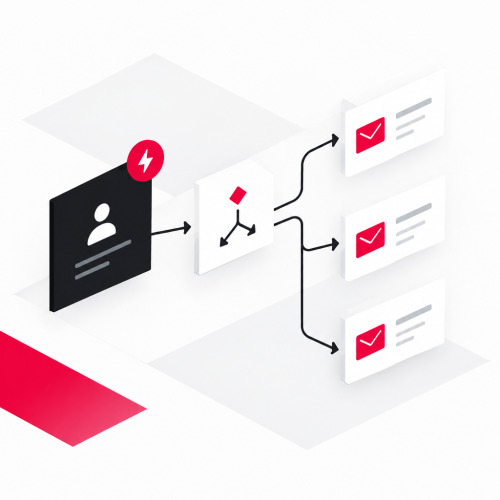

E-mail marketing automation sends the right message automatically as soon as a contact does something specific. This saves you manual work and keeps prospects engaged. This article explains how triggers and flows work together and what to watch out for when getting started. This way you can complement your content marketing with a predictable channel.
How does e-mail marketing automation work?
E-mail marketing automation reacts to events. It sends messages automatically as soon as a defined event occurs. Unlike a newsletter, it responds to the behavior and status of a contact. This way each person receives the right message at the right time.
What distinguishes automation from newsletters?
A newsletter goes to all recipients at a fixed time. An automation, on the other hand, starts per contact as soon as their trigger fires. Your team saves manual sending as a result. However, maintaining content and rules remains your responsibility.
What building blocks make up a flow?
A flow consists of three building blocks. The trigger starts it. A condition decides which path the contact takes. The action sends the appropriate e-mail or sets a status in the CRM. Each individual marketing automation email is thus part of a chain and not a single dispatch.
Content can also be dynamically customized per recipient.
What is a trigger and what types are there?
A trigger is the event that starts a flow. This can be an action by the contact, a point in time, or a change in your data. Clear triggers make your automation comprehensible.
What behavior-based triggers are there?
Behavior-based triggers respond to an action. Typical examples are registration via a form, a download, or visiting a specific page. Forms should remain lean, because forms with too many fields convert significantly worse, as landing page optimization shows.
Behavior on your website requires tracking. You need consent for this. For detailed profiles or behavior predictions, the Data Protection Conference requires explicit consent. A reference to the right to object is then not sufficient.
When do you use time-based and data-based triggers?
Time-based triggers start after a fixed interval, for example a few days after registration. Data-based triggers respond to changes in the CRM, for example a new lead status. If your data is in multiple systems, a data warehouse brings them together. A few clear triggers beat many half-finished ones. Therefore start with two or three triggers.
Which e-mail flows have the greatest impact?
Your funnel decides which e-mail flows have the greatest impact. Three flows are suitable for lead generation. The table shows them at a glance.
| Flow | Trigger | Goal |
|---|---|---|
| Welcome Series | Registration | Build trust and deliver initial value |
| Nurturing | Download or page visit | Deepen interest and initiate a conversation |
| Re-Engagement | No response over a long period | Clarify interest and clean the list |
What applies to data protection and double opt-in?
Consent first. Advertising via e-mail without prior explicit consent is considered unreasonable harassment under § 7 UWG. There is an exception for existing customers under narrow conditions. This section does not replace legal advice. For specific questions, consult a specialist lawyer.
When do you need consent?
You need consent before sending advertising e-mails. It must be voluntary and informed. The Data Protection Conference requires that it names the type of advertising, the advertised services, and the advertising company. In addition, a clear affirmative action is required. A pre-checked box is not sufficient for this.
If you use behavior on your website as a trigger, you additionally need consent for tracking. A consent management platform is suitable for this, for example.
What exception applies to existing customers?
Without consent, you may only contact existing customers under four conditions. You received the address in connection with the sale of goods or a service. You are advertising your own similar offers. The customer has not objected. In addition, you clearly informed them of their right to object when collecting the data and in every e-mail.
The Data Protection Conference also requires that you be able to prove existing customer status.
How do you document consent?
The Data Protection Conference considers double opt-in appropriate for electronic consent. The contact confirms their registration via a link in a confirmation e-mail. You must fully document the consent including the wording. Proof counts. A stored IP address alone is not sufficient according to the Data Protection Conference.
The contact must be able to declare revocation as easily as registration (Art. 7 Para. 3 GDPR). An unsubscribe link that works with one click therefore makes sense.
Which tools offer marketing automation via e-mail?
There are many tools for e-mail marketing automation. They differ primarily in trigger logic, data connection, and deliverability. Process before feature list applies to selection. The table shows four common examples with their strengths and weaknesses.
What tools are there and how do they differ?
The four tools differ significantly in structure. The information comes from the providers' documentation and from independent test reports. We do not mention prices because they change frequently.
| Tool | Strength | Weakness |
|---|---|---|
| Brevo | Automations are included even in the free plan | In the free plan, only 2,000 contacts can enter automations |
| HubSpot Marketing Hub | Workflows run across marketing, sales, and service, up to 300 in the Professional plan | Workflows are only available from Professional, Starter only offers simple processes with a maximum of 10 actions |
| ActiveCampaign | EmailToolTester's test report counts automation among the best on the market | In the Starter plan, automations are heavily limited, branching is available from the Plus plan |
| CleverReach | German provider with servers in Germany and Ireland | The free Lite plan contains only one automation |
The table shows a pattern. With Brevo and CleverReach you start with a free plan and hit limits early. HubSpot and ActiveCampaign offer more automation but require a higher plan. Plans and limits change, so check them with the provider before making a decision.
By what criteria do you choose a tool?
- The tool supports behavior-based, time-based, and data-based triggers.
- It can be connected to your CRM and your forms.
- It implements double opt-in and unsubscription with one click.
- It supports authentication via SPF, DKIM, and DMARC.
- It shows clicks and leads, not just opens.
Google's sender guidelines serve as a checklist for this. Since February 2024, Google requires all senders to Gmail addresses to use SPF or DKIM. Anyone who sends more than 5,000 messages per day to Gmail additionally needs DMARC and unsubscription with one click. The reported spam rate should remain below 0.3%.
How do you measure the success of your flows?
Measure your flows by registrations and conversation requests. Clicks instead of opens count, because open rates alone say little. According to Google, low open rates are not necessarily a sign of delivery or spam problems. Therefore define a goal per flow, for example conversation requests. Then compare variants of subject line and call-to-action one after another.
Conclusion
E-mail marketing automation is worthwhile if you start small. A welcome series, a nurturing flow, and reactivation form a solid foundation. Clarify consent and proof beforehand before the first flow runs. Choose a tool according to your process and measure clicks instead of opens. Would you like to plan or review your automations? Arrange a free initial consultation with us.
Sources & further reading
- Bundesministerium der Justiz (n.d.): Gesetz gegen den unlauteren Wettbewerb (UWG), § 7 Unzumutbare Belästigungen. Available online at: https://www.gesetze-im-internet.de/uwg_2004/__7.html
- Datenschutzkonferenz (2022): Orientierungshilfe der Aufsichtsbehörden zur Verarbeitung von personenbezogenen Daten für Zwecke der Direktwerbung unter Geltung der DS-GVO, Stand Februar 2022. Available online at: https://datenschutzkonferenz-online.de/media/oh/OH-Werbung_Februar%202022_final.pdf
- Google (n.d.): Email sender guidelines. Available online at: https://support.google.com/mail/answer/81126
- Europäisches Parlament und Rat der Europäischen Union (2016): Verordnung (EU) 2016/679 (DSGVO), Art. 7 Bedingungen für die Einwilligung. Available online at: https://eur-lex.europa.eu/eli/reg/2016/679/art_7/de
- Brevo (n.d.): FAQs, What are the limits of the Free plan? Help Center. Available online at: https://help.brevo.com/hc/en-us/articles/208580669
- HubSpot (n.d.): Workflows, Frequently Asked Questions. Available online at: https://knowledge.hubspot.com/workflows/workflows-faq
- HubSpot (n.d.): Use automation with emails. Available online at: https://knowledge.hubspot.com/marketing-email/use-automation-with-marketing-emails
- EmailToolTester (n.d.): ActiveCampaign Review. Available online at: https://www.emailtooltester.com/en/reviews/activecampaign/
- EmailToolTester (n.d.): ActiveCampaign Pricing. Available online at: https://www.emailtooltester.com/en/reviews/activecampaign/pricing/
- EmailToolTester (n.d.): CleverReach Testbericht. Available online at: https://www.emailtooltester.com/de/newsletter-tools/cleverreach/
- Für-Gründer.de (n.d.): CleverReach, Newsletter-Tool im Vergleich. Available online at: https://www.fuer-gruender.de/wissen/unternehmen-fuehren/marketing/newsletter-tool-vergleich/cleverreach/